A blog showcasing my work repairing pinball tables and building fun projects.
Saturday, February 10, 2018
bad flipper switch
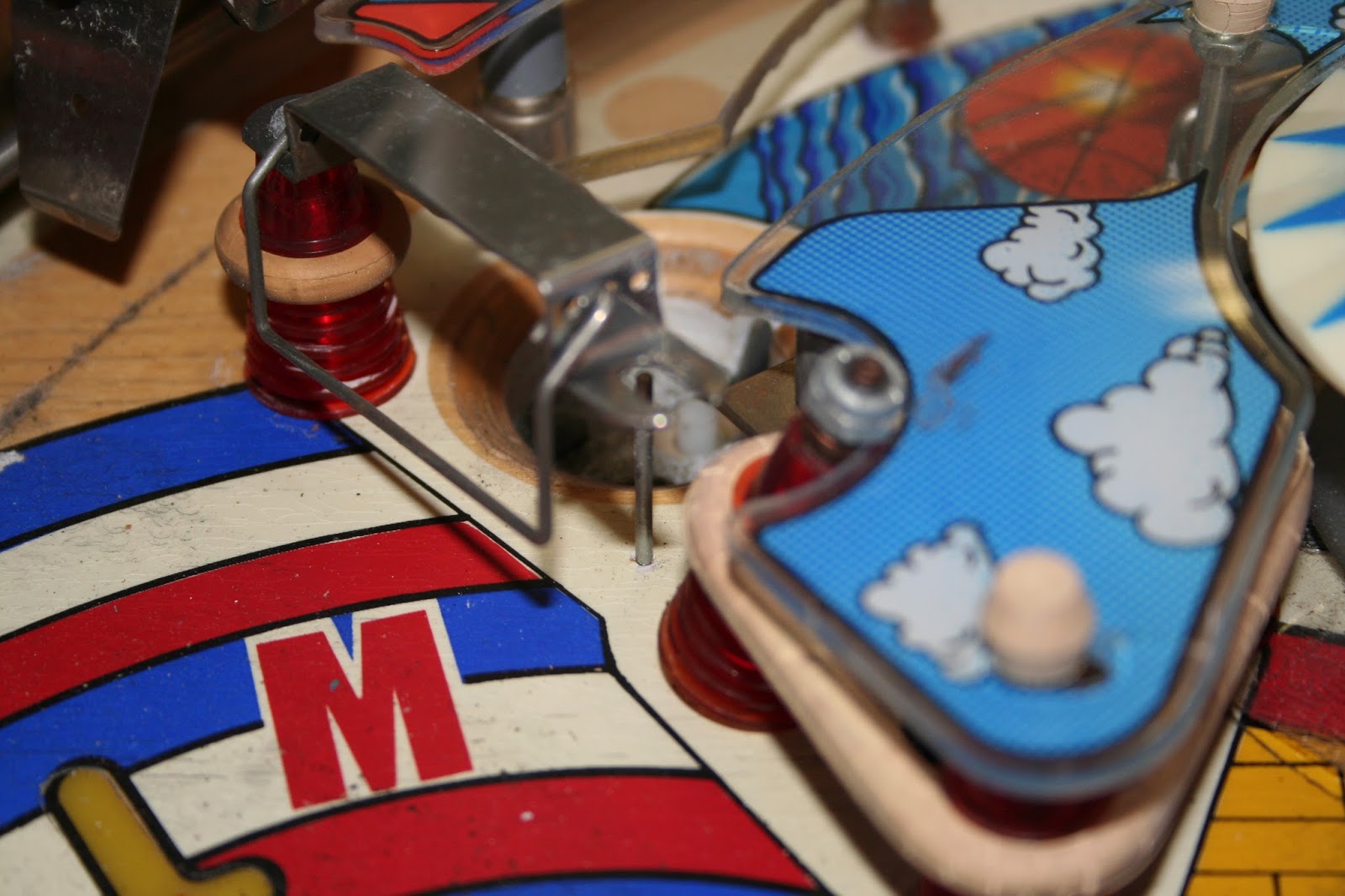
The left switch was in bad shape. It was all rusty and although I didn't get a very good picture, the contacts were touching even without the flipper button being pushed! that would be a real problem!
It was also off-center a little. So I pulled the rusty metal off and used a flapwheel sander on it which got rid of the rust quite nicely.
I then used the dremel with wire brush to clean the contacts and finally needlenose pliers to bend it out a smidge. After some repeated banging around just to test, I think I have it set up correctly.
A problem I didn't even know I had! one more thing to check when working on pinball machines.
Ball drain coil repairs
My guess is I have a bad coil or two, so let's take a look at them and see.
The most obvious starting point is the ball drain coil. Just looking at it, it looks like the paper cover is crispy, a sure sign it has over heated.
Checking the resistance on it confirms. it is only a few tenths of an ohm, basically a direct short.
After removing it I can also confirm that it's toasty, I am unable to move the plunger at all, a sure sign it has heated up and expanded inside.
I pulled it apart and set about the clean it.
Some soap and water later, it wasn't too bad but still had a lot of gunk on it, so I set to it with some sandpaper. Finally I had it decently clean.
'The plunger was pretty crappy, and it needed to be smooth for easy moving, so I sanded it down and put some metal polish on it, it looks pretty good!
Now to get a replacement coil and put it all back together. One down and who knows how many to go.
Wednesday, February 7, 2018
Argosy progress
The locksmith arrived for round two and after another hour declared he could do no more that day. Quite frankly I was ready to drill out the lock, it is a cool idea to preserve the original if possible but its not earthshattering if it needs a replacement lock.
But he was now determined and offered to come back once more on his own dime and try a last time.
#rd time was a charm! and after many more hours than expected I was now able to open the unit and see what was going on.
Step 1 was to see what happened when power was added. Basically nothing. Time to start checking fuses
Harlem Globetrotters pinball power trouble
After connecting the boards up, the test point on the board was showing low voltage. I was looking at having to pull components of the circuit board to try and solve the issue but after reading about Nic's "swab-polish-swab" technique where he wipes with alcohol, then polishes with a dremel and wire brush and then a final alcohol wipe - I decided to try it on the connectors.
It solved the problem! Although they looked perfectly ok to me and I had seated and unseated the connectors many times, this time it seems to have fixed it and I was getting the correct voltage.
I plugged all the boards in, including my new MPU board and turned it on with great anticipation.
The lights came on, but the MPU board would not go through its self-test successfully. I could hear a coil pop and then it looks like it froze.
My guess is that I have a bad coil and its causing the new power board to pop its internal breaker.
Tme to start testing coils!
Wednesday, June 3, 2015
Cleaning the dropdown - part 2 (disaster)
Time to own up. I have made a totally stupid mistake and have screwed up my table.
I took apart the dropdown and cleaned it. Afterwards the fuse blew.
After considerable head-scratching, I discovered two things:
1) I did not take good enough pictures. It seemed easy to take a couple shots and start taking it apart, but when it came time to put it back together the lack of pictures made it almost impossible to figure out which way the tiny lip was oriented on the sleeve or which wire went where.....I had lots of pictures but the wires were out of focus in every one.
2) after taking my best shot at putting it all back together and wiring it all back up and powering it on, I found I had put the solenoid in upside-down.
Which means it was wired backwards!
Naturally it pops the fuse. I took it apart, put it back together the right way and tried again. Still blows the fuse.
Checking the diode on the solenoid - Its fried....sigh.... so I ordered a replacement.
It finally arrived today and I eagerly soldered it in and turned the table on....it blew the fuse again!
...sigh...
So I disconnected the new parts and the table worked just fine. I spent considerable time digging around in the parts looking for a short or something, without success. Finally I started checking voltages, I found that the wires to the cleaned dropdown assembly had 28 volts on them all the time instead of being switched.
I am pretty sure that means I have shorted out at least one transistor on one of the boards, possibly a chip.
Oh yaaa
Thursday, May 28, 2015
Cleaning the dropdown - part 1
On the Star Trip pinball table, one of the dropdown targetswill not drop. When the ball hits it, it will usually not drop at all, sometimes it will slowly sink halfway or if I push it it will go down where it is supposed to. The other two work just fine so it was definitely a problem with the one unit.
I thought it might be a bad spring, not strong enough to pull it down and since the others were working this seemed a perfect project as I could compare the good ones with the bad one.
So I set about pulling the mechanism off the table and finding out what was wrong:
Friday, May 22, 2015
A few problems with the Harlem Globetrotters
The box itself looks to have typical old-wood problem, corners are splintering - but at least it seem solid
The electronics don't work at all. When it is turned on a few lights come on and thats it, no sound, no movement, no nothing.
The playfield is also in pretty poor shape - in addition to the missing graphics in heavy-wear areas there are some more serious issues:
This shows a representative piece of the playfield, much of the paint/graphics are cracked on the wood.
The plastic isn't much better:
The edges are scalloped, cracks around the mounting bolts and even warped sagging pieces - did it sit in the sun or under a heat lamp?
Other problems are around the bumpers, missing and bent ones are in several places:
This one is a bit tough to see but the support pin in the center is bent inward and pushing on the plastic
Also, almost every single slot/hole in the table has a worn out spot where the ball went - this table has seen a LOT of use!
On the positive side, the backglass is in great shape!
it is virtually perfect with only the beginning of paint coming off in the corners around the scoring boxes.
So this one is going to be a lot of work.....
Monday, April 20, 2015
Problems with the Hot Tip Table
Shell:
The wooden cabinet is in bad shape. corners that have splintered badly, and the front center looks as though the wood was torn apart by a tow-hitch.The top glass display is also in poor condition with multiple spots where the paint is missing or bubbling up.
Playfield:
The playfield is in decent shape with only minor wear and all graphics very visible - not bad for a table that is almost 40 years old! However - There are 2 solenoids that are not firing. Don't know if that is a wiring problem or dead solenoids, and if they are dead, how long till the rest suffer the same fate?Electronics:
The boards have all been replaced! it turns out the previous owners did quite a good job of keeping it going, including purchasing replacement boards a few years past. So things look pretty good on this end.The digital display is working good, no problems with lights or logic.
Thursday, April 16, 2015
The list of problems
Outer Shell
Playfield
The playfield looks pretty good for the age.Power/Electronics
There are some problems here.The person I purchased it from said it played well but got really smoking hot underneath and blew fuses.
In my tests, I am getting inconsistent results. The Power-On-Self-Test runs correctly so the power supply is generating the proper voltage and the main logic board is happy.
However, in 10 power-on tests. My results were:
Logic board: powered on all 10 times, worked good.
Sound board: powered on all 10 times, worked good.
Playfield lights: powered on all 10 times, worked good.
Score display: powered on 2 times. Passed test when it did come on.
Playfield solenoids: never powered on at all.
Based on the report from the previous owner that it played well and that the solenoids don't work at all and the score only displays sometimes, I am currently suspecting a power problem.
Time to get out the multi-meter!